Terminal TUI
ichtacaFull-featured keyboard-driven UI in your terminal. Tree browser, fuzzy search, masked passwords, live TOTP, create/edit/delete — all without leaving the command line.
$ ichtaca
# opens interactive TUI
# opens interactive TUI
Free & Open Source · MIT License
pass + gpg.Ichtaca wraps the standard Unix pass CLI and gpg/gpg-agent, giving you a richer interface over your existing ~/.password-store — zero migration, zero new format, zero cloud.
All three share the same passcore Rust library and the same ~/.password-store — pick the interface that fits the moment.
Full-featured keyboard-driven UI in your terminal. Tree browser, fuzzy search, masked passwords, live TOTP, create/edit/delete — all without leaving the command line.
Native desktop app (Tauri + Svelte). The same entry tree and detail panel in a window — suited for those who prefer GUI over terminal. Strict CSP; plaintext stays in the Rust backend.
Non-interactive subcommands for scripting and automation. Pipe-safe output, machine-readable JSON, stable exit codes. list · get · set · search · otp · copy · generate · show · doctor.
The same dark gold-accented palette across TUI and desktop.
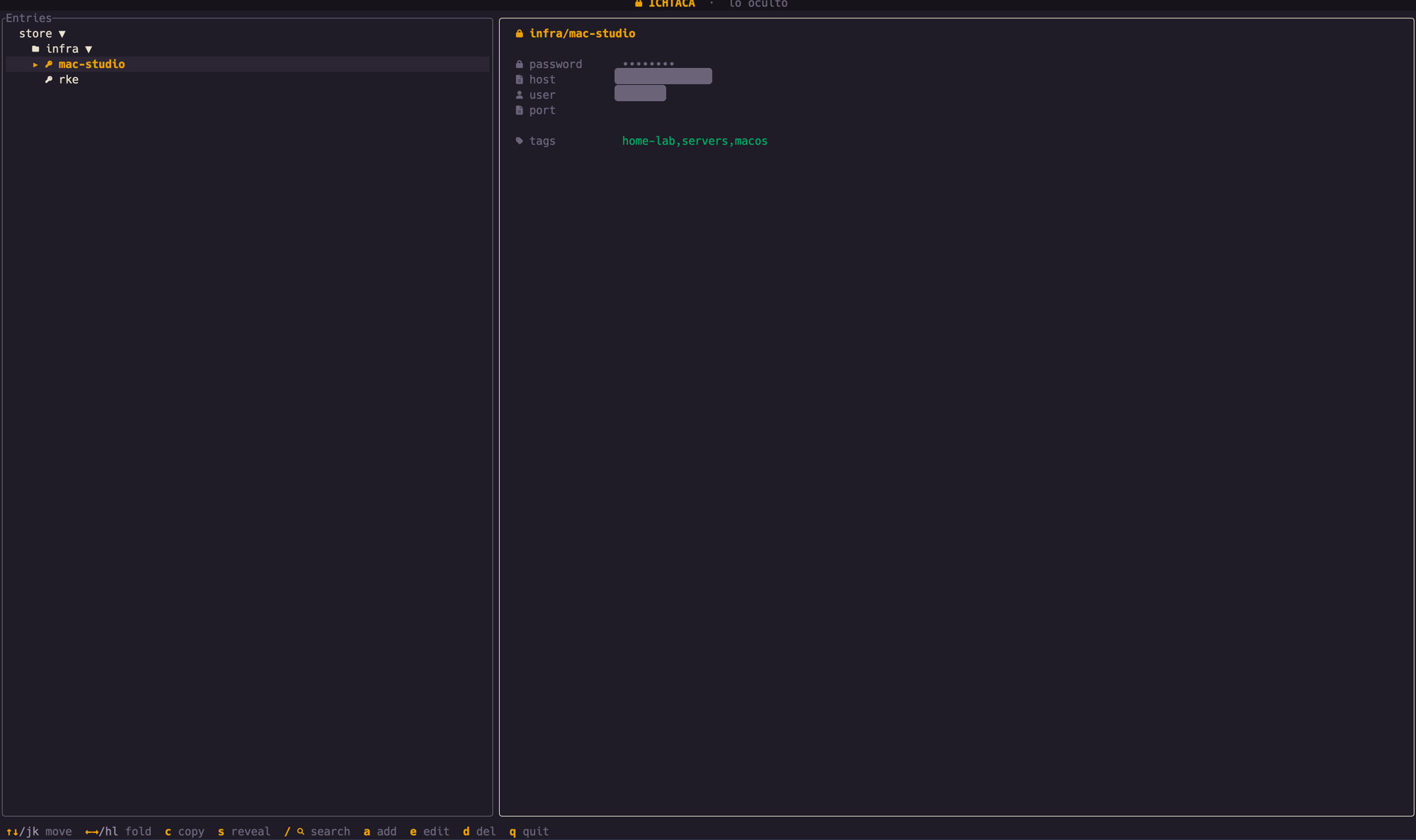
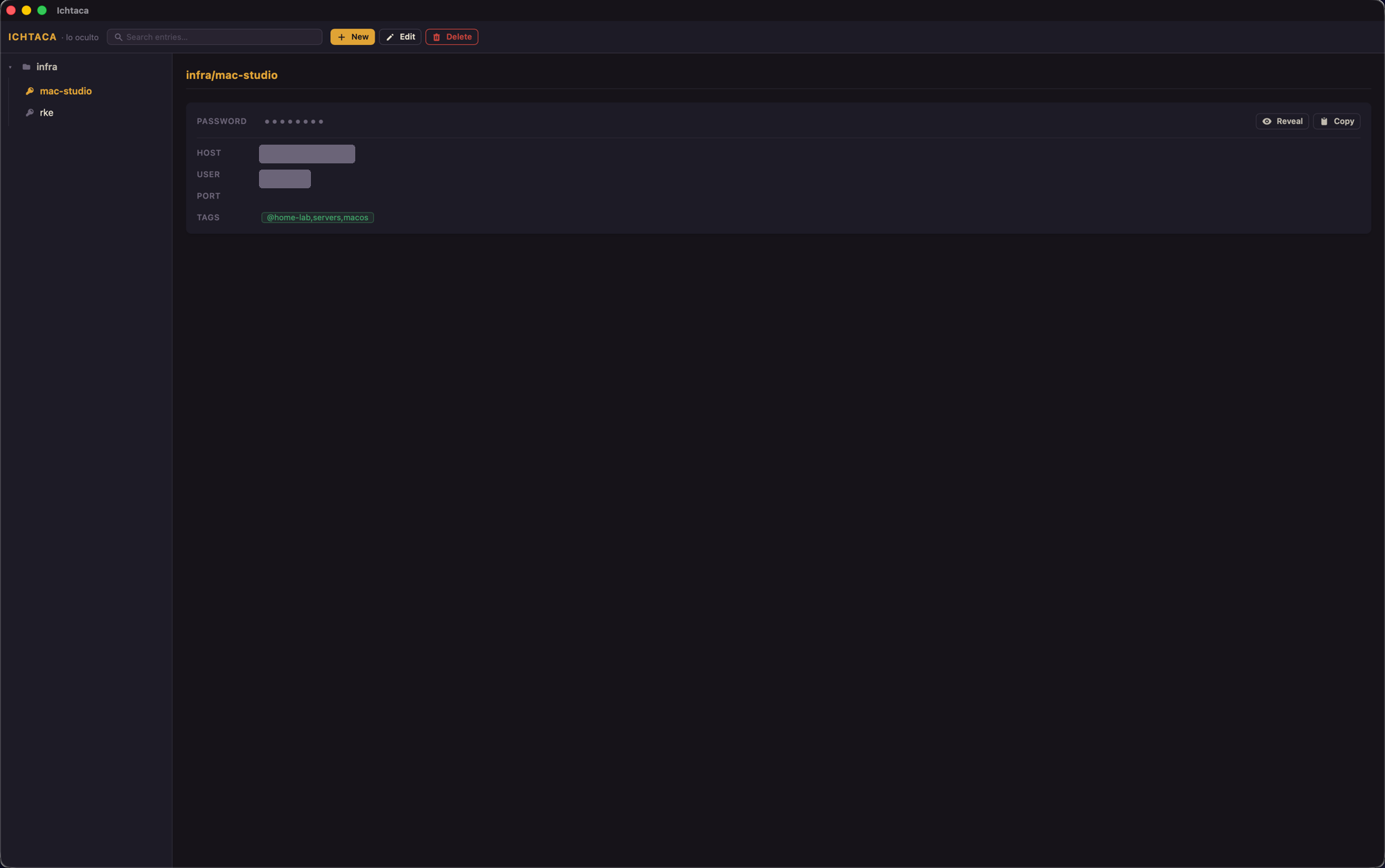
Every feature is available in both the TUI and the desktop app, sharing the same passcore Rust library.
Navigate your store directory tree with vim keys (hjkl) or arrows. Expand folders, select entries.
Passwords are hidden until you explicitly press s (TUI) or click Reveal (desktop). Fields and tags always visible.
Generate and copy one-time codes directly from otpauth:// URIs stored in entries — no separate authenticator app needed.
Copies the password via pass; clipboard is auto-cleared after 45 s (configurable), but only if the clipboard still holds your value.
Live search across all entry paths. Press Ctrl-f for content search — decrypts entries to match inside bodies and tags.
Form-based with templates, user-defined fields, and tags. Or raw $EDITOR edit for full control. Delete removes from the store.
OS-backed secure random generator; rejection-sampled to avoid modulo bias. Configurable length and character set (symbols optional).
Nine subcommands for automation: list, get, set, search, otp, copy, generate, show --json, doctor. Stable exit codes.
Ichtaca sits between bare pass (minimal UI) and cloud managers (privacy trade-offs). Here is an accurate picture.
| Feature | Ichtaca TUI + Desktop + CLI | pass alone bare CLI | Cloud managers e.g. 1Password, Bitwarden |
|---|---|---|---|
| Local-first — data stays on your machine | |||
| No cloud sync required | |||
| No telemetry / no network calls | |||
| You own and control the encryption keys | |||
| Open source (MIT / GPL) | |||
| Rich UI — tree, masked reveal, forms, tags | |||
| Native desktop app | |||
| Live TOTP in the UI | |||
| Scriptable CLI with stable exit codes | |||
Works with your existing ~/.password-store |
Cloud managers marked "–" for key ownership: some offer zero-knowledge models, but you depend on their service and key management. Open source column: Bitwarden is partially open source; 1Password is proprietary.
Ichtaca delegates all encryption to gpg/gpg-agent via pass. It adds defense-in-depth on top.
Decryption is performed by gpg/gpg-agent via the pass CLI. Ichtaca never writes decrypted data to disk and never sees your raw private key.
Sensitive values are held in a Secret type that is zeroized on drop (via the zeroize crate). They are redacted in Debug output — they cannot leak into logs or error messages.
Passwords are hidden in both apps. Reveal only on an explicit user action — s in the TUI, the Reveal button in the desktop. No accidental shoulder-surf exposure.
After a clipboard copy, a background thread clears it after 45 s (configurable). The clear is conditional: if the value has since changed — because you copied something else — it is left untouched.
IPC commands that handle secrets (copy_password, otp_code) do the work in the backend and return nothing sensitive to the webview. A strict Content Security Policy — no remote scripts, no remote URLs.
Ichtaca makes no outbound connections. The only network activity possible is git push/pull if your store uses git — handled entirely by pass git and your own git config.
pass + gpg — industry-standard primitivesAll builds are on the GitHub Releases page. This is a beta — the core read/write is stable, but expect rough edges.
ichtaca-desktop · Tauri + Svelte
.dmg.AppImage / .debichtaca · keyboard-driven
ichtaca-macos-arm64.tar.gzichtaca-macos-x86_64.tar.gzichtaca-linux-x86_64.tar.gzRequires a Nerd Font in your terminal for icons.
Get the TUIShips inside the ichtaca binary
ichtaca <subcommand>cargo installThe CLI is part of the TUI binary — download the TUI to get both.
CLI reference →.dmg/.app is not yet code-signed or notarized — macOS Gatekeeper will block it on first launch. To open it: Right-click (or Control-click) the app → Open → Open (only needed once), or run xattr -dr com.apple.quarantine /Applications/Ichtaca.app. Signing and notarization are planned for the post-beta release.Yes — completely. Ichtaca is released under the MIT License. No paid tier, no subscription, no feature gating. The source code is on GitHub.
pass already installed?Yes. Ichtaca wraps pass and gpg/gpg-agent — it does not replace them. You need both installed and a GPG key configured. Run ichtaca doctor to check your setup.
If you are starting from scratch: install pass and gpg, run gpg --full-generate-key, then pass init <your-gpg-key-id>. See the Docs for a step-by-step guide.
No — not by Ichtaca. Your encrypted .gpg files live in ~/.password-store (or wherever PASSWORD_STORE_DIR points) on your machine. Ichtaca makes no network connections whatsoever.
The only way your store touches a network is if you configure pass git to sync via a git remote — which is entirely your choice and handled by your own git configuration.
Honest answer: the core read/write functionality is stable and has been in regular use. But this is a beta with known rough edges:
• The macOS desktop build is unsigned — Gatekeeper will warn on first launch.
• There is no structured TOTP editor yet (you add OTP URIs via the raw editor).
• Documentation is still being written.
• Breaking changes may happen before a stable release.
We recommend always keeping a backup of your ~/.password-store and GPG keys when running pre-release software.
gopass is a full pass-compatible CLI replacement with team features. Ichtaca is a UI layer on top of standard pass — it does not replace pass itself.
browserpass is a browser extension for filling credentials in web forms. Ichtaca is focused on the terminal and desktop UX, not browser autofill.
The main Ichtaca differentiator: a keyboard-driven TUI, a native desktop GUI, and a scriptable CLI — all sharing the same passcore library and your existing store. No new data format, no server, no extension required.
Code-signing and notarization for macOS requires an Apple Developer ID ($99/year). We plan to add this post-beta once the build is more stable. In the meantime, you can bypass Gatekeeper with a right-click → Open, or by running xattr -dr com.apple.quarantine /Applications/Ichtaca.app.
The TUI binary (ichtaca) is not affected — it runs directly from the terminal without Gatekeeper restrictions.